1. What It Does
Bridge Keyboard is the Android app that completes the Serial-BT rig. You speak into your phone, and your words appear on your computer — typed out character by character, exactly as if you were sitting at the keyboard. It works in any program: a terminal, a text editor, a browser, a chat window.
The rig has two halves that work together: this app on your phone (voice input, text entry, and a macro deck) and the Serial-BT Keyboard Bridge — an ESP32-S3 board plugged into your PC that receives the text over Bluetooth and retypes it as a standard USB keyboard. The firmware has its own complete build guide; this page is about the app.
🎙️ Voice-first
Uses your phone's speech recognition — which is simply better than anything available on the Linux desktop — to turn speech into text.
⌨️ Zero PC setup
The PC just sees a USB keyboard. Windows, macOS, Linux — anything that accepts keystrokes works, with nothing to install.
2. Why I Built It
I run a keyboard-driven Linux setup where the Super key does heavy lifting, and I wanted a way to get long stretches of text into the machine without hunching over the keyboard — dictating notes, messages, and commands from across the room or from the recliner.
Desktop speech-to-text on Linux is rough. Android's is excellent. So instead of fighting the desktop, the phone does what it's good at (listening) and the ESP32 does what it's good at (pretending to be a keyboard). The bridge between them is Bluetooth LE.
3. How It Works
Four links in a chain, each doing one simple job:
Chunked sending
Long dictations don't go over in one blast. The app splits text into short chunks with brief pauses between them, so nothing gets dropped even on a long paragraph. Type or dictate as much as you like — it all arrives intact.
4. Parts You Need
The hardware side is the same tiny list as the firmware project:
| Item | Why | Notes |
|---|---|---|
| ESP32-S3 dev board | Runs the bridge firmware; native USB + BLE | Any S3 board with a USB port (DevKitC-1, etc.) |
| USB-C / micro-USB cable | Power + HID output to the PC | Must be a data cable, not charge-only |
| A PC (Windows/macOS/Linux) | The thing you type into | Any OS — HID works everywhere |
| An Android phone | Runs the Bridge Keyboard app | Any modern Android with Bluetooth LE |
5. The Android App
Scrimptech Bridge Keyboard is the phone-side half of the rig. One screen does everything:
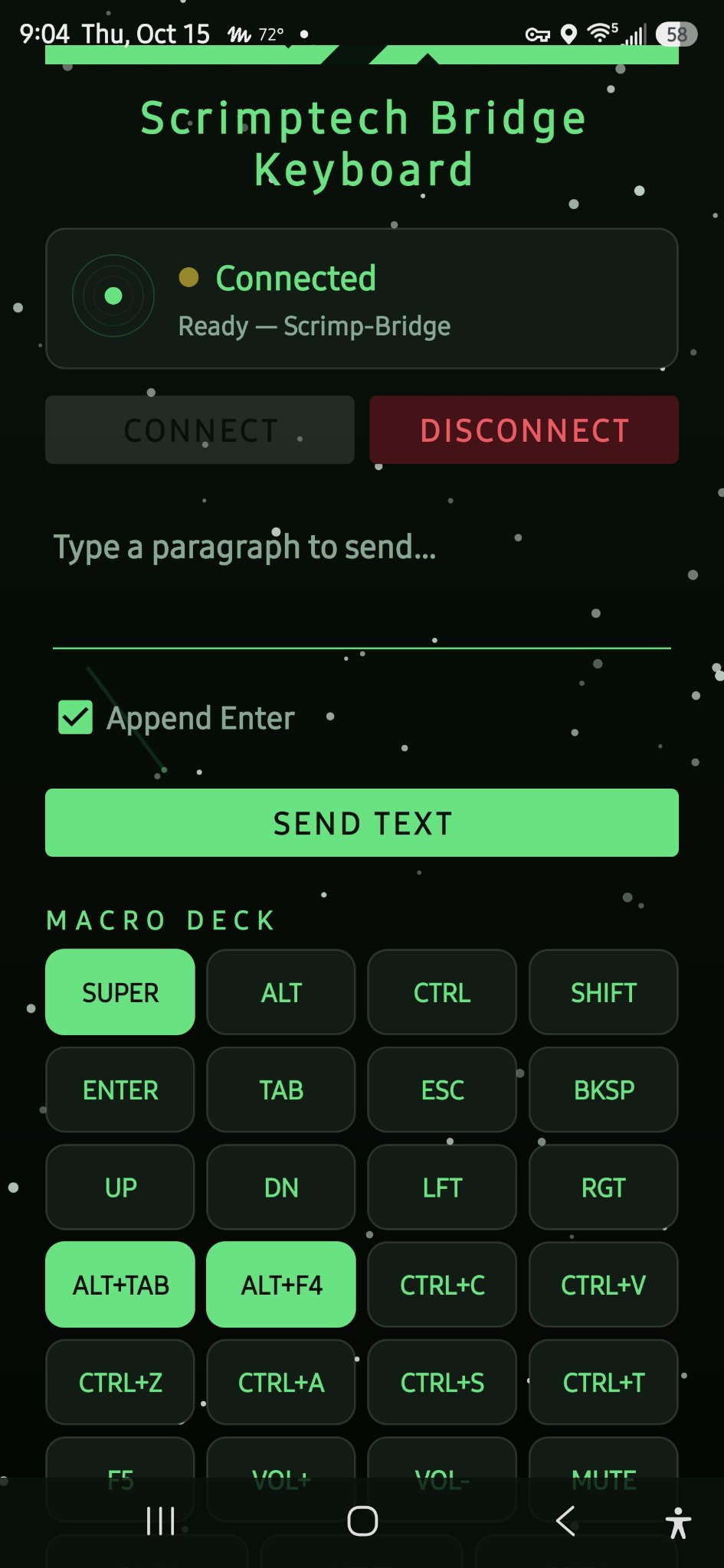
The Bridge Keyboard app — connection status, text entry, and the macro deck.
- Status card — shows whether the bridge is connected and ready, with one-tap
CONNECT/DISCONNECT. - Text field + SEND TEXT — type or paste anything, with an optional
Append Entertoggle, and fire it at the PC. - Voice input — dictate instead of typing; your phone's speech recognition fills the text field.
- Macro deck — one-tap buttons for the keys and shortcuts you reach for constantly: modifiers, arrows,
ALT+TAB,CTRL+C,CTRL+V, and more — plus text macros for things you type every day like your name and email address.
6. The Firmware It Pairs With
The board runs the serial-bt firmware: a BLE server exposing the Nordic UART Service that feeds incoming bytes into a USB HID keyboard object. The app speaks to it over the same standard profile any BLE serial app uses — no custom protocol, no pairing headaches.
Everything about building, flashing, and configuring the firmware lives in its own guide:
📖 Serial-BT Keyboard Bridge — Complete Build Guide →View source on GitHub →
7. Using It
Plug the board into your PC
Connect the ESP32-S3 with a data USB cable. It enumerates as a standard USB keyboard — no drivers needed.
Open the app and connect
Launch Bridge Keyboard, tap CONNECT, and pair with the device named Scrimp-Bridge. The status card flips to "Connected — Ready".
Focus a text field on the PC
Click into any text field — a terminal, an editor, a browser address bar. Wherever the cursor blinks is where your words will land.
Dictate or type, then send
Tap the mic and speak, or type directly. Hit SEND TEXT and watch the PC type it out. Long passages go over in chunks automatically, so nothing gets lost.
Drive the desktop from the macro deck
Need to switch windows, copy, paste, or fire a Super-key shortcut? One tap on the macro deck sends the key combo straight through the bridge.
8. Troubleshooting
| Symptom | Likely cause | Fix |
|---|---|---|
| Can't find "Scrimp-Bridge" in the app | Board not advertising yet, or out of range | Wait a few seconds after power-on; move the phone closer; reboot the board |
| Connects but nothing types | Text field on the PC isn't focused | Click into a text field on the PC first, then send |
| Dropped characters on long sends | Chunks arriving faster than the PC types | The app already chunks long text with pauses — if it persists, send shorter passages |
| Board not seen as keyboard | Charge-only USB cable | Swap in a known data cable |
| Wrong characters typed | Keyboard layout mismatch | The firmware sends US-layout keycodes; set the PC to a US layout |
9. Next Steps & Ideas
The rig works great as-is, but there's room to grow:
- More macros — per-app macro pages (one deck for the terminal, one for the browser).
- Voice commands — reserved spoken phrases that trigger key combos instead of typing text.
- Connection feedback — blink the board's LED on connect/disconnect so you can see link state across the room.
- BLE passkey — require a PIN so only your phone can send keystrokes.